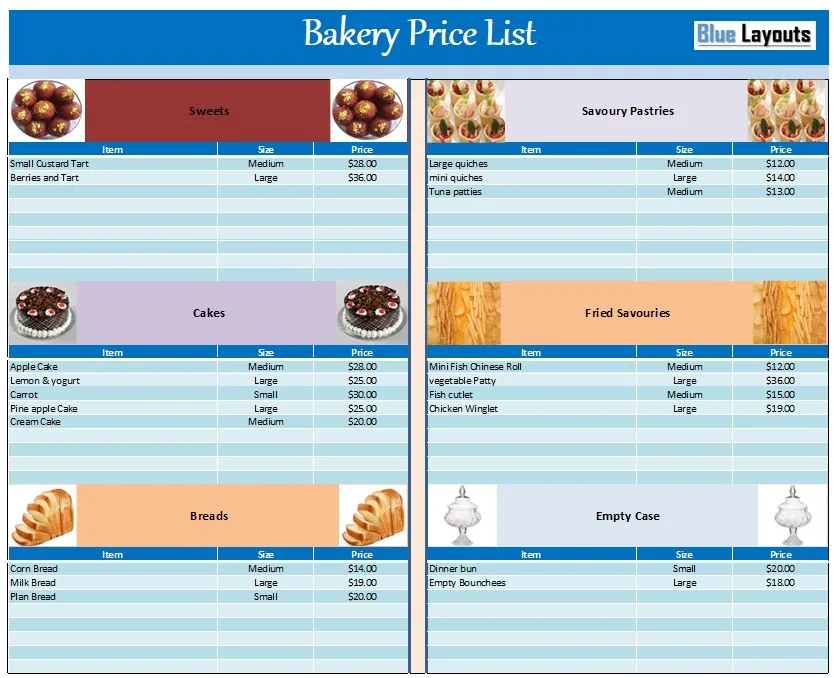
Present your baked goods, sizes, and prices clearly with this free bakery price list template for Excel. The worksheet groups products into six editable sections, with Item, Size, and Price columns in each section.
Use it as a starting point for a bakery counter list, takeaway price sheet, or customer handout. Replace the sample products and figures with your own offerings before printing or sharing.
Preview of the bakery price-list worksheet. Select the image to view it at full size.
Extract the ZIP file and save a working copy before editing. The download is an Excel workbook, not a Word document. Separate Word and PDF versions are not included.
Sample-data note: The listed prices have no stated currency or selling-unit basis. They are placeholders, not recommended prices. The workbook contains no formulas or automatic price calculations.
What the Bakery Price Sheet Includes
Original sections and editing considerations
Section
Sample content and suggested review
Sweets
Tart examples; replace the names and define the portion or package.
Cakes
Several cake varieties; replace vague size labels with your actual sizes.
Breads
Bread examples; specify loaf weight, size, or pack quantity where useful.
Savoury Pastries
Quiche and patty examples; clarify individual portions versus whole products.
Fried Savouries
Several savoury snack examples; define the selling unit.
Empty Case
An ambiguous inherited category with sample entries. Rename or replace it for your own product range.
Each section repeats Item, Size, and Price headings. The sheet does not include dedicated fields for order quantities, line totals, stock, ingredients, allergens, profit margins, or customer details. Add only the information needed for your intended use.
How to Customize Your Bakery Price List
1. Add your business and version details
Replace the title where needed and add your bakery name, contact or ordering details, and an effective date. State the currency clearly so an unlabelled number cannot be mistaken for a different currency.
Keep a dated master file and update printed and digital copies together when prices change. Remove old copies from customer-facing locations.
2. Organize the products customers can actually order
Keep relevant categories and rename the rest. For example, replace Empty Case with Cookies, Cupcakes, or another category you sell. Correct inherited wording such as “Plan Bread” and incomplete product names.
Review item names and sizes together. A sample name describing a “mini” product alongside a Large size entry needs clarification before publication.
3. Define sizes and selling units
Replace Small, Medium, and Large with measurements or descriptions customers recognize. “20 cm round cake,” “500 g loaf,” and “box of 6” explain different products more clearly than an unexplained size label.
State whether the price is per piece, slice, loaf, box, or whole cake. If different sizes have different prices, use separate entries or a clearly labeled size-price structure. Do not make customers infer the unit from the category heading.
4. Enter your checked prices
Replace every sample number with the approved price for the stated product and unit. Use consistent currency formatting and check that each amount remains aligned with the correct item after editing.
Maintain ingredient, labor, packaging, overhead, and pricing calculations in a separate costing record. This customer-facing worksheet does not calculate a selling price or establish whether an item is profitable.
5. Clarify extras and ordering conditions
Where relevant, add concise information about custom decoration, special packaging, delivery, minimum quantities, or advance ordering. Explain what a “from” price covers and when a separate quote is needed.
State the treatment of applicable taxes and additional charges clearly. Do not copy a general pricing statement unless it accurately describes the products and the way you sell them.
6. Review the final customer-facing version
Check product names, sizes, units, amounts, availability notes, and contact details. Keep the text readable. If descriptions become too long, use a second page rather than shrinking the whole sheet excessively.
Example Bakery Price-List Entries
The following hypothetical entries illustrate clear units and descriptions in USD. They are not market-price recommendations or the original workbook’s sample data.
Illustrative customer-facing listings
Item
Size or selling unit
Price
Vanilla cupcake
One standard cupcake
$3.00 each
Vanilla cupcakes
Box of 6 standard cupcakes
$16.50 per box
Wholemeal bread
500 g loaf
$4.50 per loaf
Carrot cake
20 cm round, standard finish
$30.00 per cake
The box and individual-cupcake entries describe different purchase options. If an order combines them, calculate the actual selected quantities separately; the price list itself does not create an order total.
Keep the Price List Separate from Orders and Stock
A price list shows what is offered and the price basis. It does not reserve a product, record a customer’s order, or update inventory when something sells.
For a bakery that also serves drinks or prepared meals, compare our restaurant menu templates for another presentation format. Our general price list template provides a different editable layout, although its original content is service-oriented.
Use a separate store inventory sheet for stock information where appropriate. Define your units consistently across records; this bakery price sheet does not connect to the inventory workbook or a point-of-sale system.
Printing and Reuse Tips
Review paper size, orientation, margins, and scaling in Excel’s Print Preview.
Keep the Item, Size, and Price headings aligned in every section.
Check text wrapping and section spacing after adding products.
Make a test print before producing a larger batch.
Export a reviewed PDF for sharing and retain the Excel master for later updates.
Frequently Asked Questions
Is the bakery price list Word or Excel?
The verified download contains one Excel .xlsx workbook. The earlier page description referring to Word did not match the file.
Does it calculate prices or totals?
No. It contains editable sample values without formulas. Prepare costing and order calculations separately.
Are the sample prices recommended?
No. They have no stated currency or selling unit. Replace them with your own checked prices and clear units.
Can I rename the six categories?
Yes. Adapt them to your actual range and replace the ambiguous Empty Case category.
Can I use Google Sheets?
You can try importing the workbook. Check column widths, formatting, and print layout after import.
Can I share the price list as a PDF?
Yes. Export from your spreadsheet application, inspect the result, and ensure it matches the current approved prices.