A price list template helps customers review your services and their prices in a consistent format. Group related services, use clear names, and make the price basis easy to understand before printing or sharing the finished document.
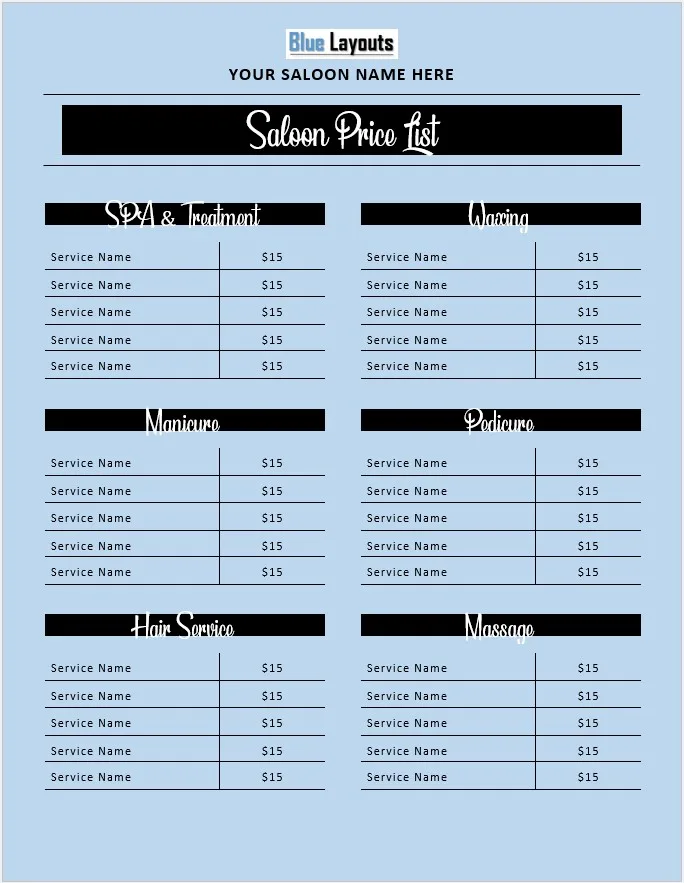
The free Word file below uses a salon and beauty-service layout. It contains service-name and price placeholders under editable category headings. You can adapt the wording for another service business, but the supplied design is not a product catalogue with item codes, package quantities, or stock calculations.
Download the Free Printable Price List Template for Word
Download format: ZIP archive containing one Microsoft Word document (.docx).
Included: Business-name placeholders, grouped service listings, and editable sample prices.
Download Price List Word Template (ZIP)
Extract the ZIP and open the document in Microsoft Word. Save a working copy before editing. Sample $15 entries are placeholders, not recommended prices. A separate Excel or PDF file is not included.
Review our Terms & Conditions for usage information.
What Is Included in This Price List Design?
The document includes business-name placeholders and headings such as Spa & Treatment, Waxing, Pedicure, Manicure, Hair Service, and Massage. Repeated “Service Name” and price entries provide a starting structure for your own listings.
The layout uses tables and positioned text elements. Review both when editing: changing one visible heading may not update another copy elsewhere in the design. Correct “Saloon” to “Salon” where appropriate, or replace it with your own business wording.
The document has no automatic price calculations, tax calculations, currency conversion, stock tracking, or connection to an online booking system.
How to Create Your Service Price List
1. Replace the business details
Enter your business name and review the title. Remove or replace every placeholder, including text inside positioned elements. Add contact information or a booking reference if needed and space allows.
Keep an effective date or version reference on the finished list so customers and staff can identify the current prices. This is an optional addition, not a built-in update feature.
2. Organize the categories
Keep the sections that match your offerings and rename or remove those that do not. Place related services together and use an order that customers can scan easily.
For more specialized designs, compare our hairdressing price list templates and nail services salon price lists.
3. Write specific service names
Replace “Service Name” with wording customers recognize. Where the price depends on scope, identify that scope: duration, treatment type, or what is included. A brief, clear description is more useful than an unexplained abbreviation.
Do not imply that an optional extra is included in a basic service. If different versions have different prices, list them separately or explain the pricing basis clearly.
4. Enter the actual prices
Replace every sample amount. Use a consistent currency and number format. Check that each price remains aligned with the correct service after editing the text.
If you use “from” prices, explain what affects the final amount. State relevant inclusions and additional charges clearly, and check the applicable price-display requirements for your business and location.
Proofread the services, amounts, spelling, and contact details. Review print preview and make a test print before producing multiple copies. If you export a PDF, inspect the exported file rather than assuming that it matches the editable document.
Update printed and digital copies together when prices change. Keep one editable master and retire obsolete copies.
Example Service Price Entries
The following hypothetical entries illustrate clear service scope. They are not recommended market prices or the template’s original sample entries.
| Service | Included scope | Price |
|---|---|---|
| Basic manicure | Nail shaping and standard polish | 20 |
| Express facial | 30-minute appointment | 35 |
| Hair styling | Basic styling; additional work quoted separately | From 25 |
The extra scope column is an example of information you may add. The supplied design primarily pairs service names with prices.
Choose the Right Price List for Your Business
This general page provides one salon-style design. If your business needs a different structure, choose a more relevant layout rather than forcing long descriptions into a small service-name field.
- Bakery price list template — an alternative for bakery offerings.
- Hairdressing price lists — layouts focused on hair services.
- Nail services price lists — designs focused on nail-service listings.
Price List, Order Form, and Invoice: Different Purposes
A price list presents your offerings and rates. An order form records what a customer requests, while an invoice records the charges for a particular transaction. Keep those functions distinct.
If customers place orders by phone, explore the telephone sales order forms. For transaction documents, browse our invoice templates. This Word price list does not transfer entries to either automatically.
Editing Tips for the Word Layout
- Keep service names readable. Shorten wording or adjust the layout instead of shrinking text excessively.
- Check text boxes and tables. Positioned elements may move when content or page settings change.
- Add entries carefully. Review spacing, page breaks, and alignment after extending a section.
- Use consistent formatting. Apply the same style to comparable services and prices.
- Retain the editable original. A PDF is useful for distribution, while the Word file supports future changes.
Price List Template FAQs
Is the price list template free?
Yes. The ZIP contains the Word document. Review the site’s usage terms before using or distributing it.
Is the file a Word document or an Excel spreadsheet?
It is a .docx Word document, with no spreadsheet calculations.
Can I use it for products?
You can adapt the wording, but the original design is a salon-style service list. It does not include dedicated item-code, package-quantity, or stock fields.
Are the sample prices recommended rates?
No. Replace them with your own approved prices and clearly stated service scope.
Can I edit it in Google Docs?
You can try importing the document. Review tables, positioned elements, and print output because the layout may change.
Yes. Check Word’s print preview or export a PDF and inspect the result. A separate PDF is not included in the download.
Explore other Microsoft Word templates or browse our list template collection.


Pingback: Free Shipping Order Template for Word | BlueLayouts
Pingback: 6 Free Restaurant Menu Templates for Word (Editable)
Pingback: Free Bakery Price List Template for Excel - Editable & Printable
Pingback: Free Nail Salon Price List Templates for Word & Excel