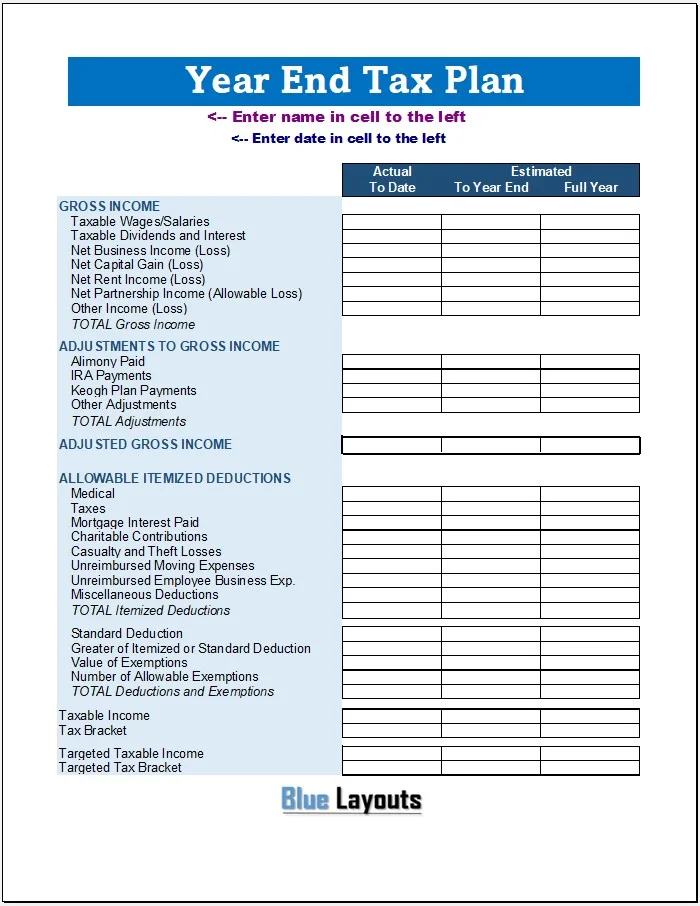
Organize a preliminary income-and-deduction projection with this year-end tax planning template for Excel. Enter actual amounts to a cutoff date and estimates for the remainder of the year to build a full-year view for review.
Check the scope before using it: the workbook is a US-style individual tax-planning layout with legacy categories, not a corporate tax model or a current-year tax calculator. It does not calculate tax liability, determine tax brackets or validate deduction eligibility. Review its categories and formulas against the relevant jurisdiction, filing status and tax year before relying on the results.
Format: ZIP containing one Excel XLSX workbook. It includes a visible Template sheet and a hidden configuration sheet. The main columns are Actual To Date, Estimated To Year End and Full Year.
Extract the ZIP and save a working copy in Excel. Replace name/date prompts and add an explicit tax year, jurisdiction, filing status and cutoff date. A separate Word or PDF file is not included.
What does the worksheet include?
Section
Original fields
Review needed
Gross income
Wages, interest/dividends, business income, capital gains, rental income, partnership income and other income
Enter the correct taxable or allowable amounts, not every cash receipt.
Adjustments
Alimony, IRA payments, Keogh plan payments and other adjustments
Labels do not establish current eligibility or limits.
Use only reviewed allowable amounts; the file does not apply legal limits.
Deduction comparison
Standard deduction and greater of itemized/standard
Confirm eligibility and the applicable amount externally.
Exemptions
Value and number of allowable exemptions
Legacy fields requiring current-year review.
Summary and target
Taxable income, tax bracket, targeted taxable income and targeted bracket
Bracket and target entries do not drive a tax-liability calculation.
There are no dedicated filing-status, withholding, estimated-payment, credit, refund or balance-due calculations. A tax-bracket label is not a tax table. Do not describe this file as a complete return or as updated for a particular year.
How to prepare a year-end projection
Define the tax year and taxpayer. Identify whose income is included and which jurisdiction and return the review concerns.
Set a cutoff date. Use column D for actual amounts through that date and column E only for the remaining portion of the year.
Gather supporting records. Reconcile payroll, investment, business and other relevant records. Keep a source reference for each material estimate.
Review classifications. Separate gross proceeds, taxable income, expenses, losses, adjustments and payments rather than using them interchangeably.
Enter reviewed deductions. Do not paste total spending into a row labeled “allowable” without checking the applicable treatment.
Check the full-year projection. Review changes since the last version and flag uncertain amounts for follow-up.
Calculate the actual tax separately. Use current official instructions or suitable tax software, including credits, other taxes, withholding and payments where applicable.
For US record organization, the IRS recordkeeping guidance explains the role of supporting documents. An expense report can summarize costs, but it does not by itself establish that they are deductible.
How the existing Excel formulas work
For an income row such as row 9, F9 adds D9 and E9, returning blank when the result is zero. The same pattern appears in several full-year cells. Section totals summarize their respective entries.
Gross income: D16, E16 and F16 total rows 9–15.
Adjustments: Row 23 totals rows 19–22.
Adjusted gross income: Row 25 subtracts the entered adjustment total from gross income.
Itemized total: Row 37 adds rows 29–36 without applying eligibility tests or statutory limits.
Deduction selection: F40 uses MAX(F37,F39), subject to its input condition.
Exemption calculation: F42 multiplies D41 by D42; F43 includes that product alongside F40.
Modeled taxable income: F45 subtracts the workbook’s deduction/exemption total from F25.
These are arithmetic operations, not proof that the tax treatment is correct. F45 can return a negative amount, and the file supplies no validated treatment for that situation. Several formulas suppress zero results, so a blank can mean zero rather than missing data. Check the inputs instead of treating every blank alike.
Do not fix an obsolete tax model merely by replacing a rate or leaving an unsuitable category at zero. Review the structure, classifications and calculation rules together. The original download remains unchanged.
Example: project income without double counting
This fictional example illustrates the actual-plus-remaining-year columns only. It does not establish taxable treatment or calculate tax due. All amounts use one currency.
Income entry
Actual to cutoff
Remaining-year estimate
Full-year projection
Wages
48,000
12,000
60,000
Interest
500
100
600
Business income
3,000
1,000
4,000
Total included income
51,500
13,100
64,600
The projected total is 51,500 + 13,100 = 64,600. Column E must contain the remaining-year estimate, not the full-year forecast again. Entering 60,000 in E for wages would incorrectly add it to the 48,000 already recorded.
Questions to review before year-end decisions
Income timing: Which recognition rules apply to the item and accounting method?
Planned spending: Is it necessary, and is it an immediate expense, a prepaid item or an asset requiring different treatment?
Losses: Are they recognized and allowable under the relevant rules, with adequate documentation?
Contributions: What eligibility, limits and deadlines apply to the taxpayer and plan?
Payments: Are withholding and estimated payments being reviewed separately from income and deductions?
Cash: Can the taxpayer afford the proposed payment without creating an operational shortfall?
Do not assume that postponing a payment automatically defers taxable income, buying an asset creates an immediate deduction, or reducing an inventory selling price creates an allowable tax loss. For US accounting-method issues, consult Publication 538 alongside the instructions applicable to the actual transaction and year.
Use the cash budget worksheet for payment timing. Taxable income and available cash are different measures, and spending more solely to reduce tax does not automatically improve the overall financial result.
Use current official guidance for deductions and payments
The IRS estimated-tax guidance explains why payment timing needs its own review. An annual projection alone does not establish that required installments were sufficient or timely. For another jurisdiction, use its own authority’s forms and rules rather than adapting US labels without review.
Frequently asked questions
Is this a current-year tax calculator?
No. It is a legacy income-and-deduction projection layout. It does not contain a verified current-year tax engine or calculate final liability.
Is it designed for a corporation?
The categories are closer to a US individual return projection, including wages, IRA-related adjustments and itemized deductions. It is not a complete corporate year-end tax model.
Does it calculate tax brackets automatically?
No bracket schedule or formula is supplied. The bracket and target fields do not calculate tax due or optimize a planning strategy.
Can I claim every deduction listed?
No. The rows are labels, not eligibility decisions. Several are legacy categories. Review current requirements and enter only amounts appropriate to the taxpayer and year.
Can I use it outside the United States?
Its actual-plus-estimate structure can help organize figures, but the tax categories and calculations need substantial jurisdiction-specific review. It is not presented as an international tax model.
Can I export it to PDF or use Google Sheets?
You can export a checked copy or try importing the XLSX. Verify formatting and formulas after conversion. A different application does not update the underlying tax rules.


Pingback: Free Retirement Income Tax Analysis Template for Excel