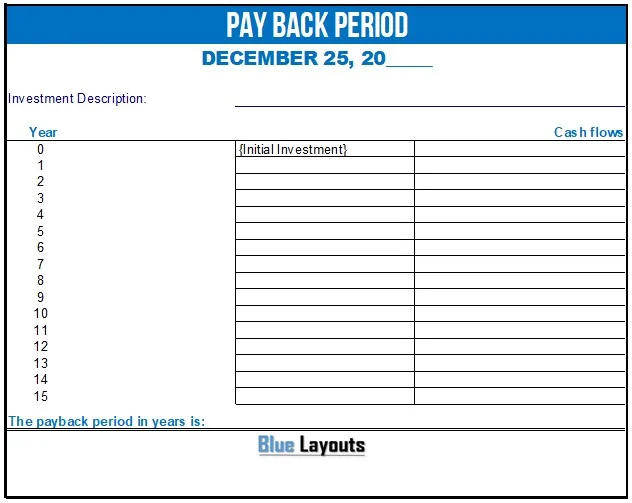
Use this payback period calculator for Excel as a starting worksheet for recording an initial investment and up to 15 years of net cash flows. Simple payback estimates how long those cash flows take to recover the initial outlay.
Review before relying on the result: the supplied workbook contains formulas, but its result and lookup logic have important limitations. Exact recovery can produce a blank result, first-year recovery can cause a lookup error, and irregular cash-flow patterns may not be handled correctly. Use the independent calculation below to check your case; the original download has not been corrected.
Format: ZIP containing one Excel workbook (.xlsx). It includes Intro and Template sheets, plus a hidden configuration sheet. The Template sheet has an investment-description area, year 0 for the initial investment, years 1–15 for cash flows and a payback-result cell.
Extract the archive and open the workbook in Excel. Save a working copy. The Intro sheet describes protected formula cells and using Tab to move between input cells. Replace the sample date and description, and review the site’s usage terms and attribution in the workbook before reuse.
What does payback period measure?
Payback measures the time needed for cumulative net project cash flows to recover the initial investment. It uses cash inflows and relevant cash costs, not sales revenue alone or accounting profit without adjustment.
Simple payback does not discount future money and ignores cash flows after recovery. It is therefore a screening measure, not a complete assessment of profitability or investment value. ACCA’s guide to payback and discounted payback explains these distinctions and the importance of cash-flow timing.
How to enter the worksheet inputs
Define the project. State what is being purchased or changed and what costs and benefits are included.
Enter the initial outlay as negative. The year-0 input is G8. For an initial investment of 12,000, enter -12000.
Enter annual net cash flows. Years 1–15 are G9:G23. Enter relevant incremental cash receipts or savings less relevant cash costs for each year.
Use consistent units. Keep one currency and annual periods throughout unless you deliberately rebuild and relabel the model.
Check the timing assumptions. Distinguish cash received during a year from an amount received only at year-end.
Verify the result independently. Review the limitations below and calculate the cumulative balance before interpreting G25.
Use a five-year projections template as a separate planning resource if helpful, but do not transfer a profit total directly into the cash-flow column. Explain the adjustments and timing behind the project cash-flow estimates.
Important limitations in the original Excel formulas
The result cell G25 contains:
=IF(SUM(G8:G23),M220,"")
That condition tests whether the total of all entered flows is nonzero. It does not test whether the investment has been recovered. For example, an initial outlay of −12,000 followed by three inflows of 4,000 totals zero, so G25 is blank even though recovery occurs at the end of year 3.
The helper calculation also uses approximate VLOOKUP against cumulative inflows. This creates further issues:
Recovery in year 1: If the first inflow exceeds the investment, the lookup target is below the first cumulative value, which can produce an error.
Recovery outside the entered horizon: The formula can attempt to look up a year after year 15 instead of reporting that payback was not reached.
Negative later cash flows: Cumulative inflows may no longer be sorted, undermining the approximate lookup assumption.
Later outflows after an earlier recovery: A first recovery date alone can conceal a subsequent return to a negative cumulative balance.
Changing only the outer IF condition does not repair all these cases. Treat the workbook as a layout requiring formula review rather than a validated calculator for every cash-flow pattern.
Check payback with a cumulative cash-flow table
In a separate worksheet, list period 0 and each later period, the net cash flow and the running cumulative balance. Start the balance with the negative investment and add each period’s flow. Find the first period in which the balance reaches zero or becomes positive.
If all cash flows occur only at year-end, use that recovery year. If the recovery-year inflow is reasonably assumed to arise evenly through the year, an interpolated estimate is:
Payback = full periods before recovery
        + amount unrecovered at start of recovery period
          / net inflow during recovery period
If the cumulative balance never reaches zero, report “Not recovered within the modeled period”. Do not report zero years or invent a recovery date beyond the forecast. Examine later outflows separately even when a first crossing exists.
Worked example with uneven annual cash flows
This fictional example assumes an initial investment of 12,000 currency units and the following net cash inflows. It illustrates an independent calculation, not a verified output from the original workbook.
Year
Net cash flow
Cumulative balance
0
−12,000
−12,000
1
3,000
−9,000
2
4,000
−5,000
3
6,000
1,000
After year 2, 5,000 remains unrecovered. Assuming year 3’s inflow arrives evenly, payback is 2 + 5,000 ÷ 6,000 ≈ 2.83 years, or approximately 2 years and 10 months. If the entire year-3 inflow is received at year-end, recovery occurs at the end of year 3 instead.
When the simple payback formula works
For a positive initial outlay followed immediately by equal positive net inflows each period, the shortcut is:
Simple payback = initial investment / net cash inflow per period
For example, 12,000 divided by 4,000 per year is 3 years. Do not use this shortcut by averaging uneven cash flows: it can hide the actual sequence and recovery point. A delayed start also needs to be reflected in the timeline.
Simple payback versus discounted payback
Discounted payback first converts future cash flows into present values using an appropriate discount rate, then checks when their cumulative value recovers the investment. The supplied workbook does not provide a discount-rate input or a discounted-payback schedule.
Neither form of payback alone captures the full value of cash flows after recovery. Use a broader cost benefit analysis and an appropriate full-project valuation alongside recovery timing. Present the assumptions, alternatives and delivery considerations in a business case.
Test assumptions before comparing projects
Recalculate with lower inflows, higher operating costs and a delayed benefit start.
Distinguish cash savings from staff capacity released without a reduction in cash spending.
Include relevant additional outlays and working-capital effects consistently.
Use the same timing and currency basis for each option.
Review cash flows over the whole project life, including later replacement or closure costs.
Frequently asked questions
Is this an online payback calculator?
No. The download is an Excel XLSX workbook supplied in a ZIP archive. It is not an interactive website calculator.
Does it calculate payback automatically?
It contains formulas, but the original result logic has the limitations described above. Check the cash-flow schedule independently and have the formulas reviewed before relying on the output.
Why should the initial investment be negative?
It represents the initial cash outflow. This workbook expects that negative value in G8 and uses its opposite sign in the helper calculation.
Why is the answer blank when the investment is exactly recovered?
If all entered flows sum to zero, the condition in G25 returns a blank. The blank does not mean there was no payback. Check the first point at which the running cumulative balance reaches zero.
Can I use monthly cash flows?
The original is labeled for years 0–15. A monthly model would need consistent period labels, interpretation and reviewed formulas. Do not enter monthly figures and read the existing result label as years.
Is a shorter payback always the better investment?
No. It indicates earlier modeled recovery under the stated assumptions. Compare full-life cash flows, value, feasibility and uncertainty rather than choosing on recovery time alone.