A cash budget worksheet helps you estimate money coming in and going out, month by month. Start with opening cash, add expected receipts, subtract planned payments, and review the projected closing balance.
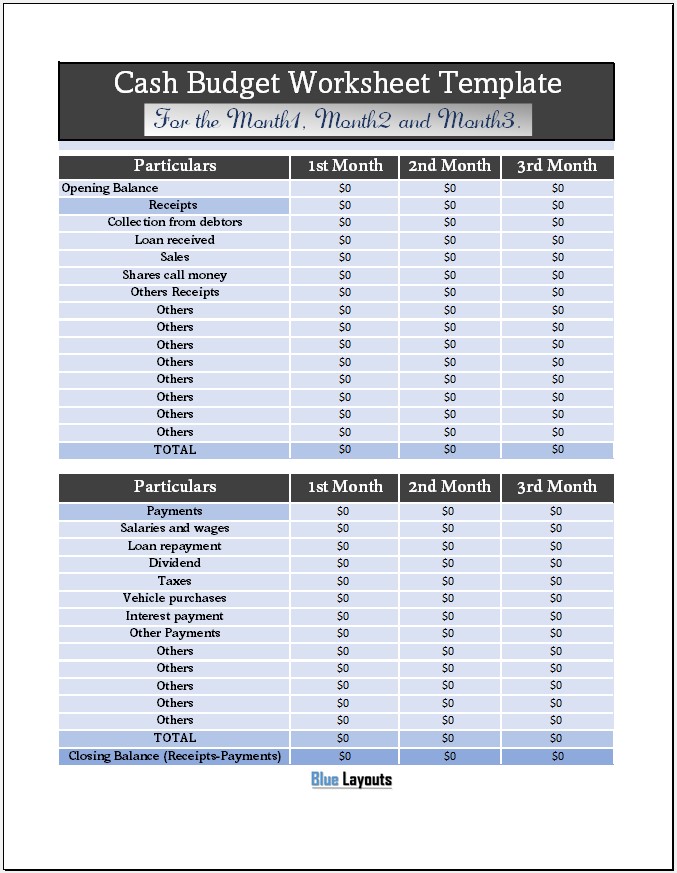
The free Excel workbook below provides three monthly columns with receipt and payment sections. Use it to organize cash timing alongside your wider budget, rather than assuming that sales revenue or profit equals cash available.
File format: Excel workbook (.xlsx). Included: One worksheet with three monthly columns, opening balances, receipt and payment categories, calculated totals, and closing balances.
Preview of the three-month cash planning worksheet. Select the image to view it at full size.
Open the file in Microsoft Excel and save a working copy. A separate Word or PDF file is not included. Review our Terms & Conditions for usage information.
What Does This Cash Budget Template Include?
Three periods: Columns labeled 1st Month, 2nd Month, and 3rd Month.
Opening balance: Cash available at the start of each period.
Receipts: Collections from debtors, loans received, sales, share-related receipts, and editable other lines.
Payments: Salaries and wages, loan repayments, dividends, taxes, vehicle purchases, interest, and editable other lines.
Totals and closing balances: Formulas that add the entries and calculate cash remaining after payments.
The file does not include a separate actual-versus-budget comparison, daily transaction log, automatic opening-balance carry-forward, or financing schedule. Choose a clearly labeled forecast or actual view and maintain any detailed schedules separately.
Replace the month labels with specific months and years. Identify which cash accounts and activities the worksheet covers, and use the same scope throughout.
Enter the first month’s opening cash balance from your records. Opening cash is money already held at the start of the period, not new income received during that month.
2. Estimate receipts by collection date
Record receipts in the month you expect the money to arrive. Separate immediate cash sales from collections of previously invoiced amounts. If you record a customer payment under collections, do not enter it again under sales.
Use the loan-received line only for cash expected from that source. A loan receipt increases cash, but it is not sales revenue. Rename unused categories to match the activity you actually need to track.
3. Estimate payments by payment date
Enter amounts in the month they are expected to be paid. Include applicable deposits, installments, and final payments without repeating the full cost in every period. Distinguish an expense estimate from the timing of cash leaving the account.
For promotional spending, use a quarterly marketing budget for the allocation and this worksheet for payment timing. Transfer each amount on a consistent basis.
4. Check cash available and closing cash
The upper TOTAL row includes the opening balance plus receipts. It therefore represents cash available before payments, even though it sits below the receipts section.
The closing balance subtracts the payment total from that cash-available total. Review the monthly result together with outstanding items. A negative projection identifies a timing or funding gap in the entered plan; it does not show an automatic loan arrangement.
5. Carry balances into the next month
The original file does not link one month’s closing cash to the next month’s opening cash. Enter those balances consistently or install the optional formulas below. Review the following months whenever earlier receipts or payments change.
Use our quarterly budget analysis template for a separate comparison of revenue, expenses, and profit. That report serves a different purpose from this cash forecast.
How the Existing Excel Formulas Work
In the original layout, the main amount cells are in columns D, F, and H. For the first month:
Opening cash: D8.
Cash available in D23:=SUM(D8:E22), which includes opening cash and the receipt entries.
Total payments in D39:=SUM(D26:E38).
Closing cash in D40:=D23-D39.
The second and third months use the corresponding ranges in F/G and H/I. Enter amounts through the worksheet’s existing input areas and avoid adding duplicate figures to adjacent cells included in these ranges.
Section headings are not extra receipt or payment entries. Keep those rows free of amounts unless you deliberately change the layout and formulas.
Optional Opening-Balance Links
To roll closing cash into the next month, enter =D40 in F8 and =F40 in H8. These are additions to the original file.
The sequence becomes: first-month opening cash plus receipts minus payments, then the resulting closing cash becomes second-month opening cash. The same process continues into the third month.
Check the calculation with a small example after editing. Do not add an opening balance and the same prior closing balance as separate entries. If you extend the worksheet with more months, preserve this sequence and check copied formula references.
Example Three-Month Cash Budget
The following hypothetical example uses one currency and linked opening balances.
Illustrative cash movement by month
Item
Month 1
Month 2
Month 3
Opening cash
2,000
2,500
1,700
Receipts during month
5,000
4,500
6,000
Cash available
7,000
7,000
7,700
Payments
4,500
5,300
5,500
Closing cash
2,500
1,700
2,200
Month 2 payments exceed that month’s receipts, but opening cash keeps the closing balance positive. Do not add the three closing balances to claim an ending cash total: Month 3’s closing figure is the balance at the end of the sequence.
Common Cash Budget Mistakes
Using invoice dates instead of collection dates: A sale recorded this month may be collected later.
Counting opening cash as a receipt: Keep money already held distinct from new inflows.
Duplicating transfers: Transfers between accounts already included in the worksheet’s scope are not additional external receipts.
Repeating deposits and full charges: Record the actual payment schedule once.
Confusing cash with profit: Borrowing, asset purchases, and timing differences affect cash differently from an income comparison.
Ignoring incomplete forecasts: A positive closing figure may be overstated if payments are missing.
For a new venture’s one-time costs, use a start-up budget template to list the costs, then schedule the relevant payments here. For an event, an event budget template can hold supplier-level details.
Customize and Review the Worksheet
Rename other receipt and payment rows to fit your activity. Use one currency throughout and record the assumptions behind uncertain amounts separately.
If you insert categories, check that totals include the new rows once. If you add months, verify opening-balance links and closing-balance references. Test the result against an independent calculation after editing.
Keep the original forecast before updating estimates. The workbook has no dedicated variance columns, so compare forecast and actual results in a separate labeled copy or summary.
Cash Budget Worksheet FAQs
Is this template free?
Yes. Download the Excel workbook above and review the site’s usage terms before using or distributing it.
How many months does it cover?
The original worksheet has three monthly columns. You can extend it, but check all copied totals and balance links.
Does it calculate closing cash automatically?
Yes. It subtracts total payments from opening cash plus receipts. The next month’s opening cash is not linked automatically in the original file.
Does it compare budget and actual figures?
No separate comparison columns are included. Keep clearly labeled forecast and actual views if you need both.
Can I open it in Google Sheets?
You can try importing the .xlsx workbook. Check merged cells, formulas, formatting, and print layout after import.
Is the closing cash balance the same as profit?
No. It reflects the opening cash and the receipts and payments entered for the period. It is not an income-statement profit calculation.