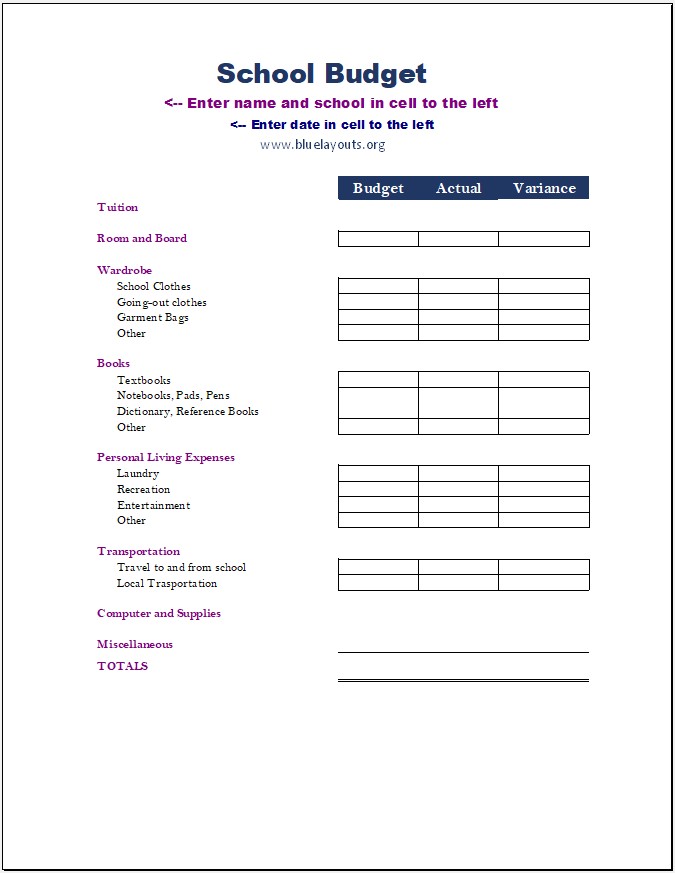
A school budget template helps students and families organize education costs before the school year or term begins. Tuition is only one part of the total: accommodation, books, supplies, transportation, and everyday living expenses also need a place in the plan.
The free Excel workbook below is designed for student education expenses. Enter estimated and actual costs, review the variance for each item, and compare the overall totals. It is not a school operating budget for staff salaries, campus maintenance, or institutional revenue.
Download the Free School Budget Template for Excel
File format: Excel workbook (.xlsx). Main worksheet: “Template,” with student expense categories, Budget, Actual, and Variance columns, and a totals row.
Preview of the student school-expense budget worksheet. Select the image to view it at full size.
Open the workbook in Microsoft Excel and save a working copy before editing. A separate Microsoft Word version is not included. Review our Terms & Conditions for usage information.
Who Is This School Budget Worksheet For?
This worksheet suits a student, parent, or guardian who wants to estimate education-related spending for a defined period. You can adapt it for a school year, college semester, or another term by stating the period clearly and using consistent figures.
It focuses on expenses. It does not have a separate income, scholarship, financial-aid, or payment-schedule section. Record funding sources separately if you need to compare available funds with the cost of attendance.
Tuition: A line for the tuition amount applicable to your chosen period.
Room and board: A combined line for accommodation and meals where appropriate.
Wardrobe: Clothing and related items, with editable descriptions.
Books: Textbooks, notebooks, stationery, reference materials, and other costs.
Personal living expenses: Laundry, recreation, entertainment, and other items.
Transportation: Travel to and from school and local transport.
Computer and supplies: Equipment and related purchases.
Miscellaneous: Additional expenses that do not fit the existing categories.
Rename outdated or irrelevant descriptions to match your needs. For example, a reference-book line could become a required digital resource or course-access fee. List an expense once: if your room-and-board amount includes a meal plan, do not add the same meal-plan cost elsewhere.
How to Use the School Budget Template
1. Choose one budget period
Add the student’s name, school, date, and the period covered. Identify whether the figures are for a month, term, semester, or full academic year. A monthly transport estimate should be converted to the chosen period before being combined with term tuition.
For costs that affect the household beyond school, maintain a separate family budget. This keeps the student’s education costs distinguishable from general household spending.
2. Enter realistic estimates in the Budget column
Use published school charges, required-book lists, accommodation information, and recent spending records. Include known compulsory fees within an appropriate labeled line or add a separate row if needed.
For recurring expenses, multiply the expected amount by the number of months or weeks in your budget period. Keep one-time costs, such as a computer purchase, separate from those recurring estimates.
3. Record actual costs using a consistent definition
Enter actual amounts from confirmed charges or spending records. Decide whether Actual represents total confirmed costs or payments made so far, and label that definition clearly. The worksheet has no separate deposit or amount-due columns.
A tuition installment is a payment toward the full charge. If you use Actual to mean total confirmed cost, entering only the first installment would understate that cost. Track installment dates and balances in a separate schedule.
4. Review the variance and totals
The Variance column subtracts Actual from Budget. A positive value means the recorded actual amount is below the estimate; a negative value means it exceeds the estimate.
Check whether the actual entry is complete before treating a positive variance as savings. If an actual-cost cell is blank, the formula can treat it as zero when a budget amount is entered.
For a review at regular intervals, the quarterly budget analysis template offers a separate comparison layout. Match the period to your school’s term structure rather than assuming calendar quarters always fit.
5. Keep funding and payment timing separate
Compare the expense total with confirmed funding in a separate record. Distinguish funds already available from amounts expected later, and note any restrictions attached to a funding source.
Use a cash budget worksheet if you need to schedule tuition installments, accommodation payments, or other costs by payment date.
How the Excel Formulas Work
The workbook includes variance formulas for its expense-entry rows and totals in row 38. In the original tuition row, Budget is E9, Actual is F9, and Variance is G9. The variance formula is:
=IF(OR(E9>0,F9),E9-F9,"")
This displays the difference when the formula’s condition is met and otherwise leaves the result blank. Other expense rows use the same approach with their own references.
The totals row adds the amounts above it. For example, the original budget-total formula in E38 is:
=IF(SUM(E9:E37),SUM(E9:E37),"")
The Actual and Variance totals use their corresponding columns. These formulas display a blank when the summed result is zero, so a blank total does not always mean that no data has been entered.
Enter costs on detail rows and leave category headings without monetary amounts unless you deliberately redesign the calculations. Adding a group subtotal inside the summed range would double-count costs already included in the detail rows.
Student School Budget Example
This hypothetical semester example uses one currency throughout. It illustrates selected costs rather than a standard fee schedule or recommended allocation.
Illustrative education expenses for one semester
Expense
Budget
Actual
Variance
Tuition
2,000
2,000
0
Room and board
1,500
1,550
−50
Books and supplies
300
260
40
Transportation
200
180
20
Total
4,000
3,990
10
Actual spending is 10 below the estimate overall, although room and board exceeded its allocation. A category review helps explain the result. In the supplied workbook, a zero variance total would display as blank because of its existing formula.
Customize Your School Expense Plan
Use relevant descriptions. Replace unused clothing, recreation, or reference-material lines with expenses you actually expect. Keep enough detail to identify each cost.
Preserve calculation cells. Enter amounts in Budget and Actual. Keep the Variance and TOTALS formulas unless you intentionally replace them.
Check inserted rows. Extend total ranges and copy variance formulas if you add expense lines. Confirm that each new row contributes to the total once.
Use one currency. Changing a currency symbol changes the display, not the underlying value. Convert any mixed-currency amounts consistently before adding them.
Save separate versions. Keep an initial plan and an updated working copy so later changes remain understandable. Review print preview before sharing the finished worksheet.
If you are preparing a funding request for a specific education expense, our budget proposal templates provide another document structure. For the costs of a school function, use an event budget template instead of mixing that event’s costs with an individual student’s spending.
School Budget Template FAQs
Is this template for students or school administrators?
The download is a student expense worksheet. It covers tuition, living costs, books, transportation, and similar personal education expenses. It does not include a complete school operating budget.
Is the school budget template free?
Yes. Use the download button above to access the Excel workbook and review the site’s usage terms before using or distributing it.
Does it calculate totals and variances?
Yes. The main worksheet includes budget-minus-actual formulas and overall totals. Its conditional formulas can show a blank when a result is zero, so review the inputs as well as the displayed result.
Can I use it for a semester or an academic year?
Yes. State the period clearly and adjust recurring estimates to cover that period. Keep tuition, accommodation, transport, and other costs on the same time basis.
Does the workbook track scholarships or financial aid?
It has no dedicated funding section. Record those sources separately if you need to calculate the gap between education costs and available funds.
Can I open it in Google Sheets?
You can try importing the .xlsx workbook. Check formulas, formatting, and print layout after import, especially how blank and zero results appear.