A business acquisition worksheet template helps organize financial information for an initial review of a business. Bring historical sales, expenses, assets, and liabilities into one summary, then trace the entries back to supporting records.
The free Excel workbook below includes a three-year overview and an asset-and-liability section. It is an information-summary layout, not a complete valuation model or due-diligence checklist. Its calculated figures need review before use.
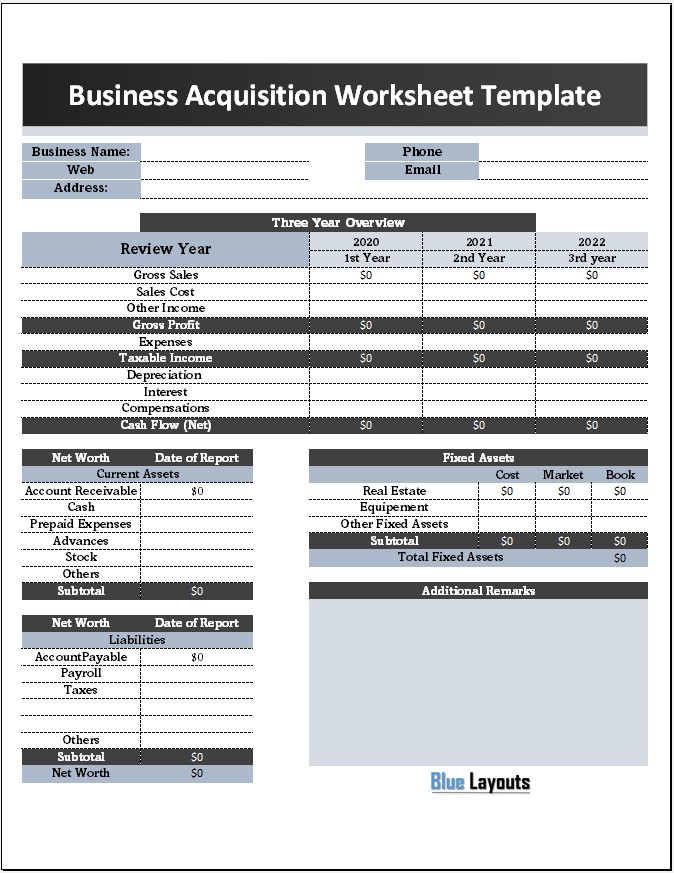
Preview of the historical financial summary layout. Select the image to view it at full size.
Before relying on results: Review the sales-cost formula, the meaning of the cash-flow row, and the mislabeled total-asset row. The original file does not determine an acquisition price.
Open the workbook in Microsoft Excel and save a working copy. A separate Word or PDF file is not included. Review our Terms & Conditions for usage information.
What Does the Acquisition Worksheet Include?
Business details: Name, address, website, phone, and email.
Three-year overview: Gross sales, sales cost, other income, expenses, and additional earnings-related rows.
Current assets: Receivables, cash, prepayments, advances, stock, and other items.
Fixed assets: Real estate, equipment, and other fixed assets, with cost, market, and book columns.
Liabilities: Payables, payroll, taxes, and additional entry space.
Summary fields: Selected subtotals, a net-worth calculation, reporting dates, and remarks.
The sample overview years are 2020, 2021, and 2022. Replace them with the periods you are reviewing. The workbook has no discounted-cash-flow valuation, earnings multiple, transaction-price bridge, financing model, or acquisition integration plan.
How to Prepare the Financial Summary
1. Define the business and reporting periods
Enter the business identity and contact details. Confirm the financial year covered by each historical column and a consistent reporting date for assets and liabilities.
Keep currencies, units, and accounting bases consistent. If one period is shorter than a full year, identify that difference before comparing it with the others.
2. Gather and reconcile source records
Use financial statements and supporting schedules for the entries. Identify estimates, adjustments, and unresolved differences separately. Keep a reference to the source and date of each significant figure.
For debt details, a business indebtedness schedule can record balances, rates, maturity dates, and security. This worksheet’s short liability list does not replace that supporting detail.
3. Review income classifications
Define what Sales Cost, Expenses, Other Income, Interest, and Compensations contain. Avoid recording an expense in both sales costs and operating expenses, or adding back an amount that was never deducted.
A reported profit figure and an adjusted earnings figure are different measures. Label adjustments and explain their basis rather than presenting all calculated results as taxable income or cash flow.
4. Enter asset values on a clear basis
Keep fixed-asset cost, market estimates, and book amounts distinct. They are not interchangeable measures. Document how any market estimate was obtained and what date it represents.
Review receivables and stock using supporting detail rather than assuming the entered balance will be collected or sold in full. A store inventory sheet can organize stock records separately.
5. Identify the liabilities included
Confirm that the listed categories cover the intended scope. Use the additional rows for relevant obligations rather than treating the original labels as a complete list.
Record unresolved items and the questions they raise. Do not omit an obligation merely because the template lacks a dedicated row.
Formula and Label Issues to Review
The original gross-profit formula adds sales costs
For the first historical year, F17 uses =SUM(F14:F16). This adds Gross Sales, Sales Cost, and Other Income. If sales costs are entered as positive expenses, the result overstates the amount.
For a conventional gross-profit presentation, use =F14-F15 in F17 and keep Other Income separate. Apply the corresponding correction in H17 and J17. If you deliberately include other income in a subtotal, use an accurate label and explain the treatment rather than calling it gross profit.
Review all dependent rows after changing the calculation. In particular, the “Taxable Income” label does not make the resulting figure a verified tax amount.
The cash-flow row is not a cash-flow statement
F23 adds F19:G22, and the later-year formulas use their corresponding ranges. The labels include taxable income, depreciation, interest, and compensation. Adding these entries does not, by itself, establish actual cash generated or a consistently defined earnings measure.
Keep this row unused or relabel and rebuild it only with a documented method. Use a separate cash budget worksheet for cash timing, supported by the relevant records. It does not validate an acquisition cash-flow estimate automatically.
The total-fixed-assets label includes current assets
K30 totals fixed-asset book amounts. K31 then adds the current-asset subtotal in C33 to K30, so K31 is a total-assets figure on that basis, despite its “Total Fixed Assets” label.
Rename K31 to describe the combined amount accurately. The net-worth formula in C44 subtracts liabilities in C43 from K31. Check both the completeness of liabilities and the valuation basis before interpreting that difference.
Example: Correcting the Sales-Cost Treatment
Suppose gross sales are 100,000, sales costs are 40,000, and other income is 5,000. Entering all three as positive amounts makes the original SUM formula return 145,000.
Gross profit from sales is instead 60,000: 100,000 minus 40,000. If other income is included in a separate subsequent subtotal, that subtotal would be 65,000 before further expenses.
This hypothetical example illustrates classification and arithmetic. It does not establish taxable income, cash flow, or business value.
Use the Summary Alongside a Broader Review
Historical totals do not determine what a buyer should pay. Keep this summary alongside the supporting financial, operational, contractual, and other information relevant to the transaction.
The U.S. Small Business Administration discusses reviewing an existing business and different valuation approaches in its business-planning guidance. The workbook does not implement those valuation methods.
A business case template can structure the rationale and open questions. Keep expected benefits distinct from historical results. For future estimates, review the five-year projections template as a separate layout.
Business Acquisition Worksheet FAQs
Is this Excel worksheet free?
Yes. Download it above and review the site’s usage terms before using or distributing it.
Does it cover five historical years?
No. The original overview has three years. You can extend it, but check formulas and layout after adding columns.
Does it calculate the purchase price?
No. It summarizes entered figures and selected totals. It has no acquisition valuation or offer-price model.
Are the installed formulas ready to rely on?
They require review. Address the sales-cost treatment, cash-flow definition, asset labels, and affected calculations before using the results.
Is net worth the same as business value?
No. The worksheet’s assets-minus-liabilities figure on the entered basis is not an acquisition valuation.
Can I use Google Sheets?
You can try importing the .xlsx file. Review formulas, classifications, formatting, and print layout after import.