A company property receipt template records equipment and other items issued to an employee. List each item, its serial or identification number, and its recorded value so the employee and company can review what was handed over.
The free Word form below includes employee and company details, an item table, acknowledgment wording, and signature areas. It is an equipment handover document, not a property-tax receipt or proof of a tax payment.
Download the Free Company Property Receipt Template for Word
Download format: ZIP archive containing one Microsoft Word document (.docx).
Included: Employee and company details, item descriptions, serial or identification numbers, values, dates, acknowledgment text, and signature areas.
Download Company Property Receipt (Word ZIP)
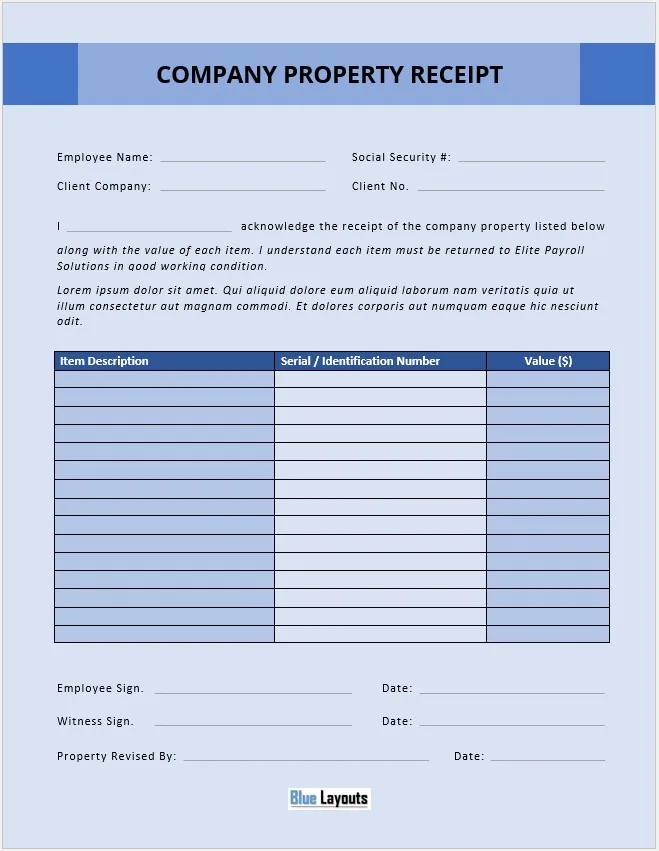
Customize before use: Replace the named-company reference and placeholder text. Review the Social Security number field and the unclear “Property Revised By” label. For routine identification, an internal employee ID is a less sensitive alternative.
Extract the ZIP and open the document in Microsoft Word. A separate Excel or PDF file is not included. Review our Terms & Conditions for usage information.
What Does the Property Receipt Record?
- Company reference: Client company and client-number fields that can be renamed for your organization.
- Employee details: Name and an identification field.
- Item description: The equipment or other property being issued.
- Serial / Identification Number: A reference identifying the item.
- Value: A monetary value entered by the company.
- Acknowledgment and signatures: Receipt wording, dates, employee and witness areas, and a company-side field needing clarification.
The original form does not include dedicated quantity, condition, department, location, return-date, or accessories fields. Add these where your process needs them. It does not update an asset register or calculate depreciation.
How to Complete the Company Property Receipt
1. Identify the company and employee
Replace the sample company references and enter the employee’s name. Rename the client number or identification field for your internal record system. Avoid collecting sensitive identifiers merely because a placeholder asks for them.
Keep the completed form accessible only to people who need the equipment-assignment record. A routine property receipt does not need to contain unrelated payroll or banking information.
2. List the actual items handed over
Use a separate entry for each identifiable asset. Include the make and model in the description and record the serial number or internal asset tag. For an item without a serial number, use a clear description or an assigned inventory reference.
List chargers, cases, adapters, keys, and similar accessories separately or state explicitly that they are included with the main item. Add quantity where multiple identical items are issued.
For stock records, review the store inventory sheet template. The signed receipt and the inventory record serve different purposes and are not connected automatically.
3. Describe condition and value consistently
Add a condition field or note if you need to record scratches, wear, missing accessories, or other observations at handover. Keep related photographs under the same asset reference where useful.
State what Value means, such as recorded purchase cost or another documented basis. It is not automatically the employee’s liability, an insurance value, or an amount to deduct from pay.
4. Rewrite the acknowledgment
The original wording acknowledges receipt of property and refers to returning it to a named company. Replace that name and review the text against your actual process. Remove the placeholder Latin text.
Keep receipt acknowledgment distinct from any separate equipment-use, loss, damage, or repayment policy. Do not assume the downloaded wording establishes a complete policy or authorizes payroll deductions.
5. Clarify signatures and dates
The label “Property Revised By” does not clearly identify a handover role. Rename it appropriately, such as “Issued By,” if that is its intended purpose. Add printed names and clear dates where needed.
Use the witness field only where it belongs in your process. Ensure that each signature area states what the person is acknowledging.
6. Keep the receipt and inventory record aligned
Save the completed receipt against the employee and asset references. Record changes when equipment is exchanged, reassigned, or returned. Preserve earlier receipts rather than silently replacing the history.
If equipment is sent remotely, a shipping order form can record dispatch details. Dispatch information and the employee’s acknowledgment of receipt are separate records.
Example Equipment Entries
The hypothetical entries below illustrate descriptions and identifiers. Values use one stated currency.
| Item description | Serial / identification number | Recorded value |
|---|---|---|
| Laptop, ExampleBrand Model L, with power adapter | Asset IT-014; serial recorded in register | 900 |
| External monitor, 24-inch, with power cable | Asset IT-032 | 180 |
| Office key, one copy | Key reference K-07 | Not assigned |
Add condition and accessory details separately if they do not fit the original columns. Do not substitute example values for your own records.
Issuing Property Versus Recording Its Return
The supplied acknowledgment describes receiving company property and an expectation of returning it. It is not already a completed return receipt.
To adapt a copy for returns, change the title and acknowledgment, identify the person receiving items back, record the return date, and add condition and missing-item notes. Check the list against the original issue record without erasing that record.
A separate sign-off sheet may support a review step, but it does not replace the item-level details needed for equipment reconciliation.
Choose the Right Type of Receipt
This form records custody of company assets. For a payment acknowledgment, explore our cash receipt templates. For possessions kept at home, the household inventory sheet is a different record-keeping layout.
Neither this company property form nor those related templates is a government-issued property-tax receipt.
Company Property Receipt Template FAQs
Is this property receipt template free?
Yes. The ZIP contains the Word document. Review the site’s usage terms before using or distributing it.
Is the template for equipment issued or returned?
The original acknowledgment is for property received by an employee. Rewrite the relevant fields and wording before using it to record returns.
Does it include an Excel file?
No. The download contains one .docx document.
Do I need to retain the Social Security number field?
No. Customize the identification fields for your process. An internal employee ID is generally sufficient for routine equipment tracking.
Does the Value column establish an amount owed?
No. It records the value you enter. Do not treat it by itself as an authorization for repayment or a payroll deduction.
Can I edit the document in Google Docs?
You can try importing the Word file. Check tables, positioned text, signatures, and print output because the layout may change.
Browse more printable forms or explore our receipt templates.


Pingback: Free Equipment Inventory Log Template for Word | BlueLayouts
Pingback: Free PC Comparison Template for Excel | BlueLayouts