Choose from nine free printable weekly calendar templates for Word to organize appointments, work blocks, study, and everyday plans. The collection includes open day-by-day layouts, hourly grids, a half-hour schedule, and dated calendar examples you can adapt.
Start with the layout that matches how much detail you need. Use an open weekly overview for a few commitments per day, or a timed grid when you want to reserve space for appointments and focused work.
Compare the nine downloads | Set up your week | See a planning example
Download Free Printable Weekly Calendars
Each ZIP contains a Word document. Downloads 01 and 02 use DOC format; the remaining seven downloads use DOCX. The original download numbers are 01, 02, and 04–10.
Some files contain sample 2021 dates, holidays, or year artwork. Update the actual date sequence and any dated decoration before using those layouts for a different period. The undated options offer a simpler starting point for a reusable weekly page.
01. Monday-First Timed Weekly Grid
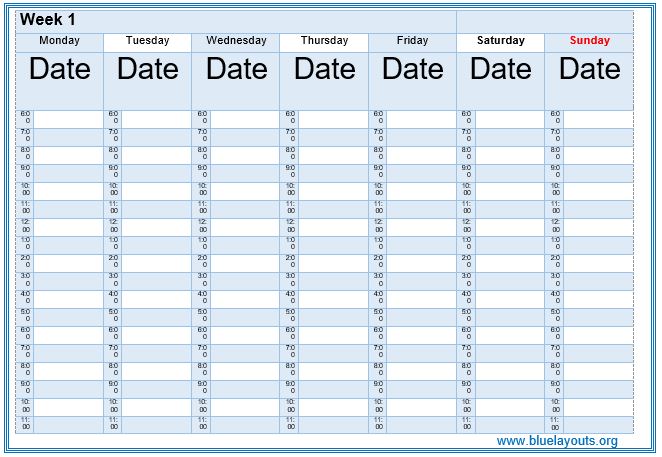
A landscape preview with Monday through Sunday columns, date placeholders, and time rows. Choose this Word DOC option when you want each day alongside the others. Fill in the date for every column and check the printed time labels against your routine.
02. Open Weekly Calendar with Notes
A landscape Word DOC layout with Monday through Thursday on the left and Friday through Sunday plus Notes on the right. It provides open writing areas without fixed appointment times, making it suitable for short daily plans and reminders.

04. Calendar and Events Layout
The linked DOCX contains a calendar layout with a 2021 label and an events area. The original page pairs it with a preview numbered 03 showing a compact dated calendar. Review the full document, then replace dates and headings for the period you intend to plan.

05. Sunday-First Hourly Weekly Calendar
A portrait DOCX grid with Sunday through Saturday columns and hourly labels beginning at 6 AM and continuing into the evening. Includes sections labeled Week 1 through Week 4. Add actual date ranges and adjust the time labels if your schedule differs.

06. Simple Day-by-Day Weekly Planner
A portrait DOCX layout listing Sunday through Saturday with open space beside each day. Includes Week 1 through Week 4 sections. Choose it when a daily list is more useful than a detailed hourly schedule.

07. Lined Weekly Calendar with Notes
A DOCX with weekly date-range headings, lined daily sections, and Notes. The sample dates begin in late December 2020 and continue through 2021, with dated decoration visible in the preview. Update the full date sequence, holiday labels, and year artwork for reuse.

08. Weekly Calendar with Large Daily Boxes
A landscape DOCX arranging seven daily boxes and a Notes area across two rows. Includes sample weekly dates for 2021 and decorative backgrounds. Replace the dates throughout the file and review holiday entries before using the layout for another year.

09. Weekday Hourly Planner with Weekend Areas
A DOCX layout with hourly weekday columns and separate Saturday and Sunday areas. The preview includes New Year 2021 artwork and the document contains sample January dates and holiday text. Update those elements and label the intended time convention clearly.

10. Half-Hour Weekly Appointment Calendar
A DOCX with Sunday through Saturday columns, half-hour labels from 6:00 through the late-evening sequence, and Week 1 through Week 4 sections. Use it for detailed appointment planning, adding dates and clear AM/PM or 24-hour labels as needed.

Which Weekly Calendar Should You Choose?
| Planning need | Options to compare |
|---|---|
| Open space for short daily plans | 02 or 06. |
| Timed appointments across the week | 01, 05, or 10. |
| A detailed half-hour schedule | 10. |
| A lined weekly page with notes | 07, after updating dated elements. |
| Large daily boxes | 08, after replacing sample dates. |
| More weekday detail and compact weekend areas | 09, after updating dates and year artwork. |
A calendar shows when commitments occur. A weekly to-do list helps organize actions that still need a time or day assigned. Use the two together without copying every task into several competing lists.
How to Set Up a Useful Weekly Calendar
- Write the full date range. Confirm whether your chosen layout starts on Sunday or Monday, then enter dates in the correct columns or boxes.
- Add fixed commitments first. Record meetings, classes, appointments, travel, and deadlines. Include start and end times when duration matters.
- Choose a few outcomes. Identify the work you want to move forward this week, then break it into specific actions that can fit into available time.
- Reserve realistic blocks. Include preparation, breaks, and transitions. A ninety-minute task needs three half-hour blocks, not a single appointment cell.
- Use a simple marking convention. For example, use a check for completed work and an arrow for rescheduled work. Keep any color labels easy to understand on a grayscale print.
- Review during the week. Update changes deliberately, check upcoming deadlines, and decide what unfinished work still needs attention.
Keep longer appointment notes and detailed daily tasks on a daily planner when the weekly page becomes crowded. The weekly calendar can remain the overview.
How to Update a Dated Calendar Layout
Changing “2021” to a new year does not realign dates with weekdays. To reuse a dated design, prepare a clean copy and update each date in its correct position for the intended period.
- Replace the week’s start and end dates, including weeks that cross a month or year boundary.
- Check every weekday/date pairing against a reliable current calendar.
- Remove or update sample holidays according to the location and calendar you use.
- Review background images, watermarks, headings, and footers for printed year references.
- Check all pages, not only the first previewed week.
If you want a reusable form, retain weekday names and add blank date fields. Start with an undated layout such as 02 or 06 when you prefer to avoid updating a long dated document.
Weekly Calendar Planning Example
This fictional example shows a report-writing project alongside fixed commitments. Add actual dates to your selected layout before entering the week.
| Day | Calendar entry | Practical note |
|---|---|---|
| Monday | 09:00–10:00 — gather source files and prepare the report outline. | Confirm which files are still missing. |
| Tuesday | 10:00–10:30 — team check-in; 11:00–12:30 — draft the findings. | Reserve preparation time outside the meeting slot. |
| Wednesday | 09:30–10:30 — check supporting figures. | Flag unresolved questions for the reviewer. |
| Thursday | 14:00–14:30 — review comments; 14:30–15:30 — revise the draft. | Adjust if feedback arrives later. |
| Friday | 11:00–11:30 — final check; submit by 15:00. | Keep the submission deadline visible. |
| Weekend | Add personal plans and any deliberately scheduled review. | Leave unneeded space open. |
The example leaves time for other responsibilities. If a commitment involves people in different locations, write the relevant time zone beside it rather than relying on a time alone.
Using a Weekly Calendar for Work or Study
For personal work planning, use short entries that explain the task or result. For study, combine fixed classes with independent reading, assignments, and revision sessions. Review the workload before placing several major deadlines on the same day.
For allocating employee work, compare the separate weekly work schedule template. A shared staffing schedule needs clear names, responsibilities, and coverage information, while a personal calendar can focus on one person’s commitments.
Edit and Print Your Weekly Calendar
- Keep a blank master and save a new copy for each date range.
- Match the document and printer paper sizes, checking again after switching between A4 and US Letter.
- Adjust row heights and writing space without making the text too small.
- Clarify time labels, especially the change from morning to afternoon.
- Inspect colored or decorative backgrounds for readable contrast.
- Choose the pages you need when printing a multi-week file.
- Review the exported PDF as well as the editable Word document.
Frequently Asked Questions
How many weekly calendar downloads are available?
Nine. The existing download numbers are 01, 02, and 04–10. The calendar preview numbered 03 on the original page links to download 04; that pairing is retained above.
Are these templates for Word or Excel?
They are Word documents: two DOC files and seven DOCX files, each supplied in a ZIP archive. Extract the file before opening it.
Are all the calendars undated?
No. The collection includes undated layouts and documents containing sample 2021 dates or year artwork. Review the description and update the selected file for the period you need.
Can I change the time range?
Yes. Edit the time labels and rows in a working copy, then check that the sequence remains clear. Review existing entries after changing the grid.
Do the files generate dates or reminders automatically?
These are manually maintained Word layouts. Enter dates, appointments, and updates yourself; they do not synchronize with a calendar app or send reminders.
Is a PDF included?
The archives contain Word documents. You can export your customized calendar as a PDF after checking dates, page breaks, and print readability.


