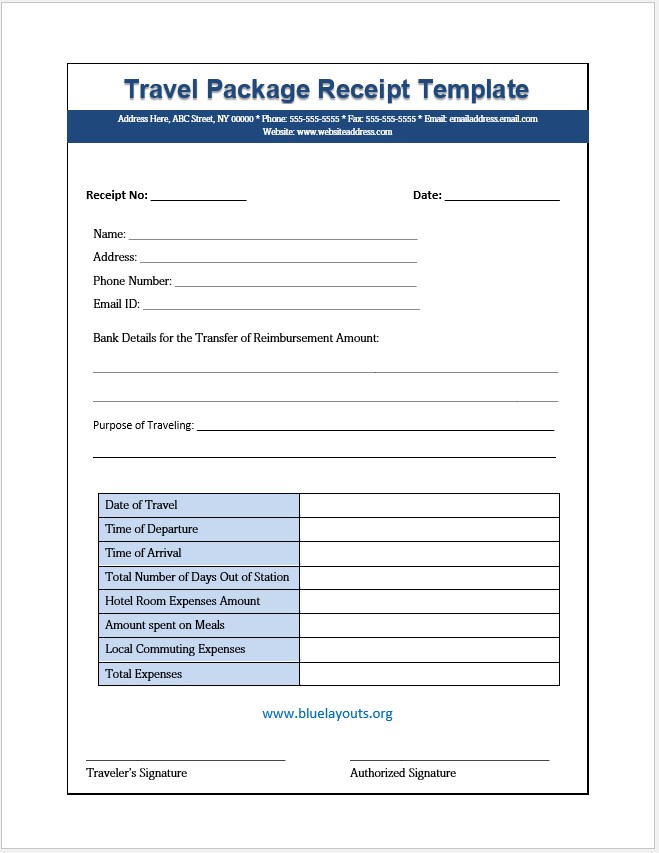
Use this free travel package receipt template for Word as a starting layout for recording a traveler’s expenses and submitting reimbursement details. The document includes traveler information, the purpose of travel, hotel, meal and local commuting amounts, a total, and signature areas.
Check the form’s purpose before use: despite its title, the supplied layout is closer to a travel expense reimbursement form than a travel agency’s payment receipt. It has no dedicated fields for a package price, amount paid, payment method, or outstanding balance.
Format: Microsoft Word (.docx). Included: traveler details, reimbursement information, a trip-expense summary, and traveler and authorized signature lines.
Amounts and totals are entered manually. The document does not calculate reimbursement, process payments, or verify supporting receipts.
Travel Receipt and Expense Form Preview
The preview shows the original sample title and contact details. Replace these and clarify the document’s purpose before issuing the form.
What Does the Download Include?
Section
Original fields
Reference
Receipt number and date
Traveler
Name, address, phone number, and email
Reimbursement
Bank details for transfer of the reimbursement amount
Purpose
Reason for traveling
Trip details
Date of travel, departure time, arrival time, and total days out of station
Expenses
Hotel room, meals, local commuting, and total expenses
Signatures
Traveler’s signature and authorized signature
The original has no separate airfare, currency, advance, approval-date, or payment-reference fields. Add them only as needed for your process.
How to Complete It as a Travel Expense Form
Save and rename the document. Consider “Travel Expense Reimbursement Form” if that describes its intended use. Change Receipt No to Claim No or Reference No where appropriate.
Replace sample contact details. Enter the issuing organization’s correct name and contact information.
Identify the traveler and trip. Complete the relevant contact details and purpose. Add departure and return dates if a single Date of Travel field is insufficient.
Enter expenses by category. Use actual supported amounts and state the currency. Reference the receipts or other records used.
Add missing categories. If necessary, include transport tickets or other approved costs separately rather than hiding them in hotel or meal totals.
Check the total. Add the included amounts manually and ensure the total agrees with the supporting records.
Submit for review. Have the traveler and authorized reviewer complete the relevant areas under your organization’s procedure.
For a more detailed breakdown, use the expense report templates. Keep the same trip reference across the summary and supporting expense records.
Expense Total, Approved Amount, and Payment Are Different
The Total Expenses field summarizes the amounts recorded. It does not by itself identify what was approved or paid. If reimbursement is the purpose, add separate fields for the approved amount, any advance applied, and the final payment reference where your process needs them.
For example, a claim showing 300 in recorded expenses and 100 in an advance would leave 200 only if all 300 is approved and the full advance is applied. Label the calculation and check the actual decision rather than assuming the expense total equals the amount still due.
Use a cash receipt template when you need a separate acknowledgment of money received. Neither an expense entry nor a reviewer’s signature alone should be labeled as confirmation that payment occurred.
If You Need a Travel Agency Payment Receipt
The supplied form needs substantial changes for this purpose. A customer-facing receipt should identify the agency, customer, booking reference, payment date, amount received, currency, payment method or transaction reference, and the package or services the payment relates to.
Keep the package total, previous payments, current payment, and outstanding balance distinct. Identify a deposit as a deposit rather than marking the booking paid in full. Remove reimbursement-bank fields if they are irrelevant.
A payment receipt, invoice, itinerary, and booking terms serve different purposes. Browse our invoice templates for billing layouts; do not assume this sample contains a full itinerary or cancellation terms.
Handling Supporting Documents
Add a receipt-reference column or an attachment list if several documents support the claim. Keep each reference connected to the expense it supports so a reviewer can trace the summary.
The sample requests bank information. Use your organization’s approved payment-details process and collect only what is needed. Avoid circulating bank details in a general trip summary when the payment team already holds them securely.
For expected trip costs before spending, use the vacation budget template. A budget is a plan, while this expense form records amounts submitted after or during travel.
Editing and Printing Tips
Clarify labels: make the title, reference field, dates, amounts, and signature roles match the process.
State units: identify currencies and distinguish dates from departure or arrival times.
Add signature dates: the original signature lines do not have dedicated date fields.
Review the layout: check that added rows and longer names do not overlap other elements.
Save a final copy: export a checked PDF if needed, retaining the editable master and supporting records.
Frequently Asked Questions
Is this a Word document or Excel workbook?
The download is a Word .docx file. It has no automatic totals or currency conversion.
Does it prove a travel package has been paid for?
Not as supplied. It mainly records travel expenses and reimbursement information. A payment acknowledgment needs the actual payment details.
Can I use it for domestic travel?
Yes. The fields are not limited to international trips. Adapt them to the journey and the expense process.
Does it include airfare?
There is no dedicated airfare field. Add a clearly labeled row if it is relevant, and keep the supporting reference.
Can I remove the bank-details section?
Yes. Remove it if it is unnecessary or handled through a separate approved process. Preserve the references needed to connect the form to the payment record.


Pingback: 8 Free Expense Report Templates for Excel & Word