Prepare for your next interview with this free job interview preparation checklist for Word. The document groups reminders into four stages: Preparation, First Impression, The Interview, and Final Stage. Print it for handwritten checks or edit the wording to suit your interview format.
Use the checklist to organize research, examples, questions, and practical arrangements. The guidance below also covers video interviews and follow-up tasks that need to be added to the original file.
The file is a printable checklist, not an automated interview coach or an employer evaluation form. The squares are symbols rather than interactive completion controls.
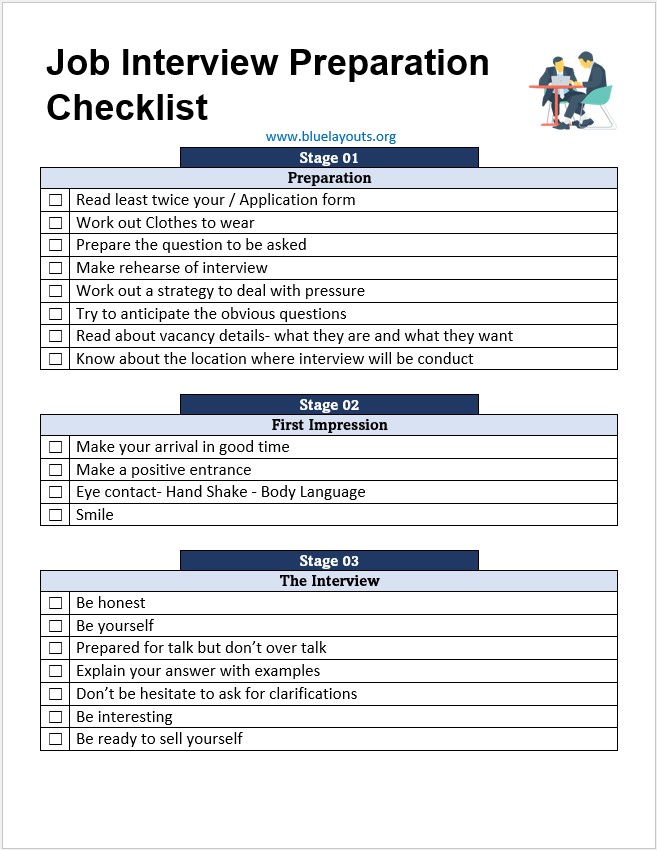
Interview Checklist Preview
The preview shows the first three stages. The Word document also contains a Final Stage section with closing and review reminders.
What Is Included in the Download?
Stage
Original checklist focus
Preparation
Application review, clothing, questions, rehearsal, role details, and location
First Impression
Arrival, introduction, and communication reminders
The Interview
Honest answers, relevant examples, clear explanations, and clarification
Final Stage
Thanking the interviewer and reviewing the experience
Some original lines need editing. Replace the incomplete “Read least twice your / Application form” with “Review the resume and application you submitted.” Correct “Lear” to “Learn,” and rewrite awkward phrases in clear language. Replace the suggestion to interpret the employer’s body language with a reminder to ask about the next steps and expected timeline.
Before the Interview: Research the Role and Your Application
Review the job description: identify the main responsibilities and skills you need to discuss.
Research the organization: use its own website to understand its products, services, customers, and relevant recent work.
Read your submitted documents: be ready to explain dates, responsibilities, projects, and achievements accurately.
Confirm the format: check whether the interview includes a panel, presentation, technical task, or portfolio review.
Confirm logistics: record the date, time zone, location or meeting link, contact person, and any requested materials.
If you are organizing your application documents, browse our resume templates. Keep a copy of the version you actually submitted so your preparation matches the interviewer’s information. The employment application forms page offers separate application layouts; it is not part of this checklist download.
Prepare Examples Instead of Memorizing a Script
Choose a few genuine examples that connect your experience to the role. For each, outline the situation, your responsibility, the action you took, and the result. This structure can help you keep an answer focused without inventing achievements or memorizing every sentence.
Practice explaining examples of teamwork, problem-solving, a difficult task, and something you learned. Use figures only when you can support them. For an early-career role, relevant examples can come from study, volunteering, projects, or other experience.
Prepare for questions such as:
What experience is most relevant to this position?
Why are you interested in this role and organization?
Can you describe a problem you solved and your contribution?
How did you handle feedback or a setback?
What would you like to learn or develop in this role?
If a question is unclear, ask for clarification. If you do not know an answer, explain honestly what you know and how you would approach finding out.
Add a Video Interview Setup Check
The original document does not include a dedicated remote-interview section. Add these tasks if the meeting is online:
Confirm the meeting platform, link, date, and time zone.
Test the microphone, camera, speakers, and connection beforehand.
Check your display name, lighting, and background.
Keep the device powered and the organizer’s contact details available.
Close notifications and unrelated windows, particularly if screen sharing is expected.
Keep requested documents accessible and agree a backup contact method if the connection fails.
For an in-person interview, plan the route, building access, travel time, and required materials instead. Add any access or communication arrangements you need to confirm with the organizer.
Questions to Ask the Interviewer
Prepare questions that help you understand the work and expectations. Adapt them to what has already been discussed:
What would the main priorities be in the first few months?
How does the team measure success in this role?
Who would I work with most closely?
What training or onboarding is available?
What are the next steps and the expected decision timeline?
Use a daily planner to schedule research, practice, and travel or setup time. These preparation tasks are separate from the interview appointment itself.
After the Interview
Write down the topics discussed, any requested follow-up materials, and the stated next steps while they are fresh. If you send a thank-you message, keep it brief and specific to the conversation. Follow the interviewer’s instructions about further contact and timing.
Review your own preparation: which examples were clear, which answers needed more detail, and what you would change next time. Do not treat a gesture or facial expression as confirmation of the hiring decision.
How to Customize and Print the Checklist
Save a copy for the particular role and interview.
Add the employer, role, interview date, time zone, format, and contact details near the title.
Correct the sample wording and add remote or in-person tasks as needed.
Add notes or target completion dates beside preparation tasks.
Review all pages in Print Preview so the Final Stage section is not overlooked.
Mark the square symbols by hand or replace them with a check mark in Word. If you want clickable checkboxes, you need to add Word checkbox controls yourself.
Frequently Asked Questions
Is the checklist for candidates or hiring managers?
It is written for candidates preparing to attend an interview. It is not an interviewer scoring sheet or hiring decision form.
Is a PDF included?
The download is a Word .docx file. You can export a PDF after editing and checking the page layout.
Can I use it for an online interview?
Yes. Add the video setup checks above because the original file does not provide a dedicated remote-interview checklist.
Does it include sample answers?
No. The file contains reminders rather than a question bank or scripted answers. Prepare examples from your own experience.
Can I reuse it for several interviews?
Yes. Keep a blank master and save a separate copy for each role. Update the research, logistics, examples, and questions each time.


Pingback: 6 Free Professional Reference List Templates for Word - Blue Layouts