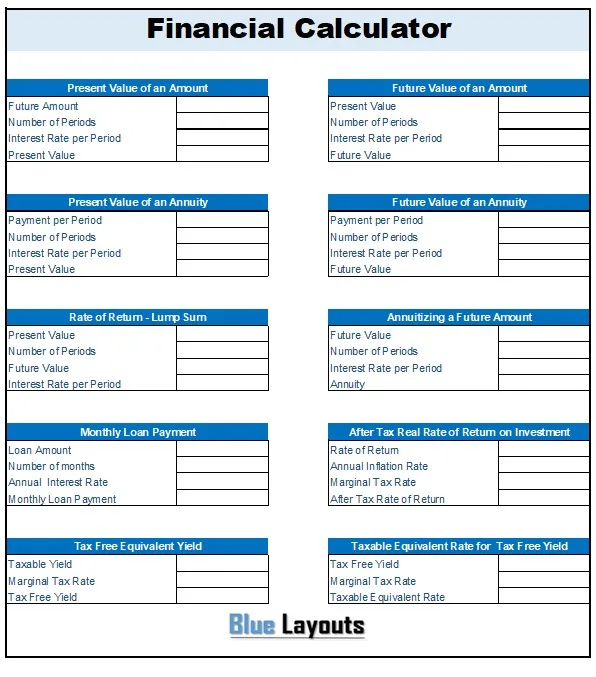
Explore present value, future value, annuity payments and loan payments with this basic financial calculator for Excel. The workbook brings ten calculation areas onto one worksheet for entering assumptions and comparing simple scenarios.
Review before use: this is a time-value-of-money worksheet, not a financial-ratio dashboard or an NPV/IRR project model. Several formulas return blank for valid zero-rate inputs. The “Annuitizing a Future Amount” section also needs clarification or correction, and the after-tax real-return section uses an approximation. The original download remains unchanged.
Download the Basic Financial Calculator Spreadsheet
Format: ZIP containing one Excel XLSX workbook. It includes a visible Template sheet and a hidden configuration sheet. There is no separate Word or PDF version in the archive.
Extract the ZIP, open the workbook in Excel and save a working copy. Enter your assumptions in the relevant section and keep the result cells intact unless deliberately installing a reviewed replacement formula.
What can the workbook calculate?
Calculation area
Result cell
Purpose or qualification
Present value of an amount
C9
Discounts one future amount.
Future value of an amount
F9
Compounds one starting amount.
Present value of an annuity
C15
Values equal end-of-period payments.
Future value of an annuity
F15
Accumulates equal end-of-period payments.
Lump-sum rate of return
C21
Solves a constant rate per period from starting and ending values.
Annuitizing a future amount
F21
Original formula treats the amount as present value; review the intended purpose.
Monthly loan payment
C27
Uses loan amount, number of months and annual rate.
After-tax real return
F27
Uses a simplified tax adjustment and subtracts inflation.
Tax-free equivalent yield
C32
Applies a simple marginal-tax-rate assumption to taxable yield.
Taxable equivalent yield
F32
Grosses up a tax-free yield under that simplified assumption.
The file does not include current ratio, inventory turnover, debt-to-equity, project NPV or project IRR calculations. Its lump-sum RATE calculation is not an analysis of irregular investment cash flows.
Keep rates, periods and payment timing consistent
Most sections ask for an interest rate per period. If periods are years, use a rate per year. For monthly periods, use the corresponding monthly rate. Dividing a nominal annual rate by 12 is appropriate only when that is the intended rate convention; an effective annual rate requires a different conversion.
The loan section is different: C26 takes an annual interest rate and the formula divides it by 12; C25 is the number of months. Enter rates explicitly as percentages, such as 6%, rather than assuming an entry of 6 means six percent.
The annuity formulas omit the optional payment-timing argument, so they use end-of-period payments. Microsoft documents matching period units and cash-flow signs in its PV function guide. Its PMT documentation also explains payment timing and notes that the result excludes taxes and fees.
Use the present value of annuity worksheet for a separate regular-payment analysis. Record whether the first payment occurs now or one full period later before comparing results.
Formula issues to review in the original file
Valid zero rates can produce blank results
Several formulas use the rate itself as an IF condition. At 0%, they return blank even though a valid calculation exists. For example, a zero-interest loan of 10,000 repaid over 20 months requires payments of 500 before any additional charges; C27 does not show that result as supplied.
This affects multiple amount, annuity, loan and yield areas. A blank is not proof of zero value. Conversely, C15 checks whether any of its inputs are numeric rather than requiring a complete valid input set, so missing fields can still produce an error or misleading result.
“Annuitizing a Future Amount” uses a present-value factor
F21 divides F18 by a present-value annuity factor. That can represent a payment supported by a present lump sum, but it does not calculate the end-of-period deposits needed to accumulate the stated future target.
If the intended question is “How much must I deposit each period to reach this future amount, starting from zero?”, an optional replacement in F21 is:
This example assumes a nonnegative rate, a positive period count, equal end-of-period deposits and no starting balance. Relabel the result “Deposit per period for future target.” If you instead want a withdrawal from a present fund, keep that separate interpretation and label the input as present value.
After-tax real return is an approximation
F27 uses F24*(1-F26)-F25. It subtracts inflation from a simplified after-tax nominal return. Under the same simplified assumption that the return is fully taxed at the entered rate during the period, the compound purchasing-power adjustment is:
=(1+F24*(1-F26))/(1+F25)-1
This does not model actual tax law, account types, tax deferral, capital gains or different taxation of return components. The yield-equivalence sections likewise use simplified arithmetic and do not establish that a particular investment is tax-free or comparable in risk.
Check mathematical and scenario limits
Use a positive number of periods for the examples here. A tax rate of 100% makes the taxable-equivalent denominator zero. Negative or unusual rates, incomplete inputs and inconsistent cash-flow signs need separate review. The workbook does not provide comprehensive input validation.
Optional monthly loan formula with a zero-rate case
For a simple fixed-rate loan repaid fully through equal end-of-month payments, you can replace C27 in a working copy with:
This accepts a zero annual rate and rejects negative principal/rate or a nonpositive term for this limited model. It does not handle balloon balances, irregular dates, financed fees or variable rates. Add whole-month validation if that is required. The original download has not had this formula installed.
Worked examples to check your inputs
These hypothetical examples use constant rates and regular end-of-period cash flows. They are independent calculations, not market forecasts.
Approximately 443.21 per month, excluding other charges
Deposits for a future target
Target 12,000 after 3 years; 5% per year; no starting balance
Approximately 3,806.50 each year-end
For the last example, the original F21 formula gives approximately 4,406.50 because it applies a present-value factor. That difference reflects a different question, not a rounding issue.
For an 8% nominal return, 25% simplified tax rate and 3% inflation, the original subtraction method gives 3%. The compound adjustment above gives approximately 2.91%. Neither result predicts investment performance or confirms actual tax treatment.
Choose the right tool for the financial question
A basic bond valuation template combines regular coupon payments and principal for a specific valuation model. A payback period worksheet addresses investment-recovery timing and has its own formula limitations. Those are different tasks from compounding a single amount.
Keep a dated record of assumptions and compare scenarios one change at a time. Check important results independently before using them in a financial decision.
Frequently asked questions
Is this an online financial calculator?
No. It is an Excel XLSX download. You enter assumptions in the workbook rather than calculating interactively on this page.
Can it calculate NPV, IRR and business ratios?
Those calculations are not included. Its RATE area solves the growth rate between a present and future lump sum, not project IRR for a sequence of cash flows.
Why do some zero-rate entries show blank?
Several formulas test the rate as a condition and return blank when it is zero. Valid zero-rate scenarios need reviewed formulas such as the limited loan example above.
Are annuity payments monthly or yearly?
The general annuity areas use periods. The payment frequency must match the entered rate and period count. Only the loan area is specifically labeled for monthly payments and an annual rate.
Does the loan payment include all borrowing costs?
No. The original PMT formula models principal and interest from the stated inputs. It has no dedicated full-cost schedule for fees, taxes or other charges.
Can I use Google Sheets?
You can try importing the XLSX file, then check formulas and layout. Importing does not resolve the original formula and labeling issues.